

How System Integrations Work
AtroCore Integrations synchronize data between your systems through configuration, each one tailored to your needs and guaranteed to work.
System Integrations at a Glance
AtroCore Integrations connect AtroPIM/AtroCore with every system that holds or needs your product data, whether ERP, marketplace and e-commerce platform, multichannel and DAM system, CMS and DXP, or PLM and PDM. Each scenario is tailored to your landscape. No coding is required, only configuration. Every integration is implemented individually against your specific requirements and validated on your own data before go-live, which is why we can commit to a solution that works in your environment. These are the highlights of what you get:

Orchestrated exchange on your schedule
Data exchange is organized in Synchronizations that run manually, on a cron-based schedule down to minute intervals, or event-based when a record is created, updated, or reaches a defined status. Each data type keeps its own cadence, so master data is transferred nightly while prices and stock update hourly.

Any system, any transport method
Connections are established via REST and SOAP web services, direct database access, or file exchange over SFTP, FTPS, HTTP(S), and network shares, combining several methods where useful. The same mechanisms apply on-premises, in the cloud, and in hybrid landscapes, with AtroCore initiating outbound connections so no inbound port has to be opened.

Bidirectional and complete in scope
Data is pulled and pushed within the same scenario, covering every entity, attribute, and relation in the system, including your own custom entities and fields, attribute values per language and channel, prices, stock information, and digital assets with their metadata.

Mapping and transformation without development
Field-level mapping, format settings for CSV, Excel, JSON, and XML, filters, action types, value transformations, and optional scripts for data preparation are all configuration rather than code, so even unusual source structures are handled without a custom development project.

Fully transparent for your administration
All configurations are viewable and editable in the administration interface, from the Synchronization down to a single field mapping. Configuration is stored as data rather than code, which keeps it upgrade-safe and lets your administrator respond to a changed source structure without a deployment or developer involvement.

Reliable operation with full logging
Delta loads and key-based record matching keep runs efficient and repeatable, parallel Sub-Jobs keep large data volumes fast, and automatic retries plus error files resolve most problems without manual work. Every run creates a Job with complete logging, monitored through Dashboard Widgets and failure notifications.
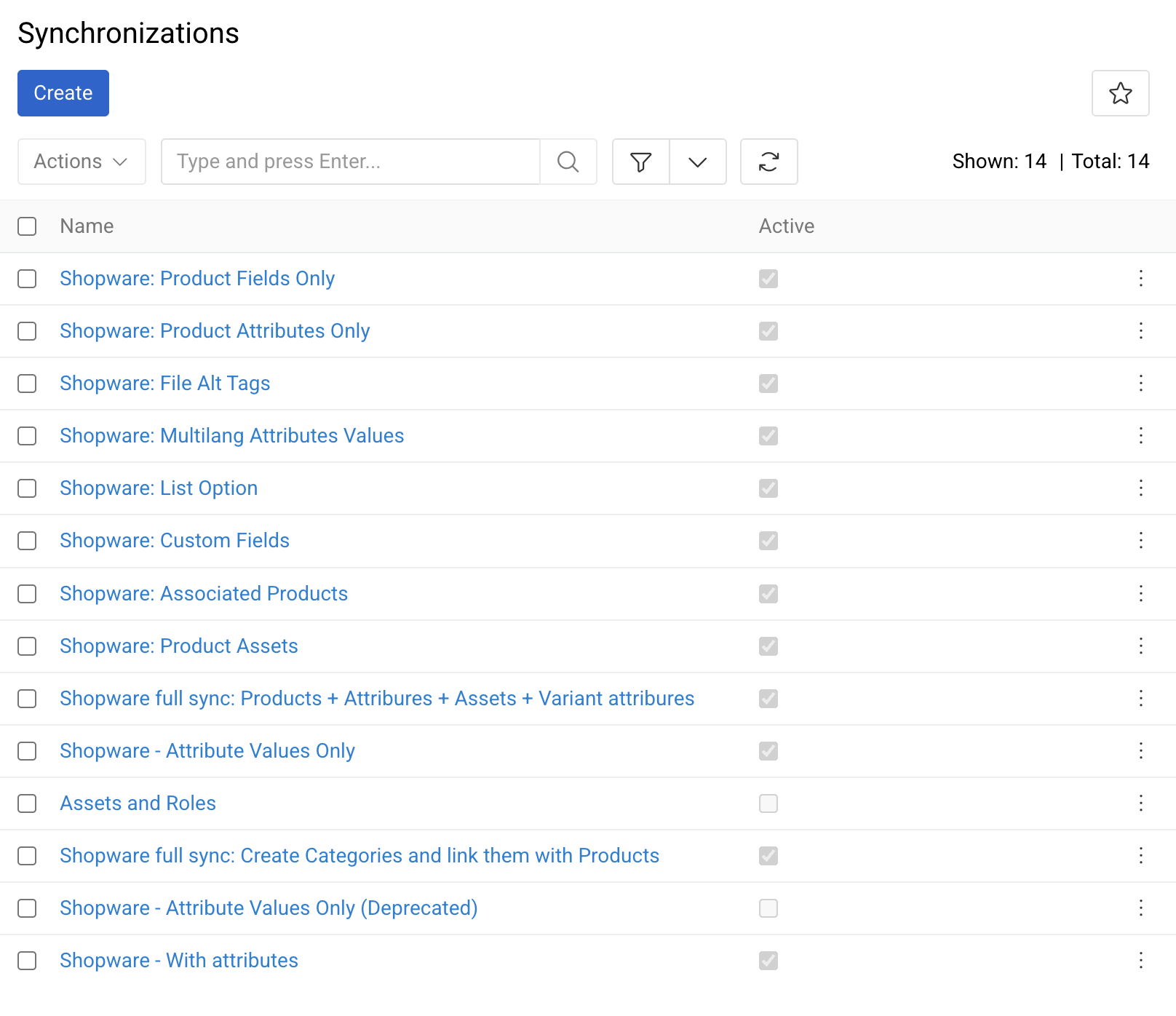
Synchronizations Orchestrate the Data Exchange
- Configured by our team: during the implementation project, we analyze the interfaces of your systems, document the available endpoints, tables, and export formats, and agree with you which system is the leading source for each entity and each field before the first Feed is built.
- Everything is visible and editable in the administration: all configurations, from the Synchronization and its schedule down to the mapping of an individual field, are stored as data and maintained in the administration interface, where an administrator with the corresponding permissions views, adjusts, and extends them at any time.
- No additional middleware: the integration layer is part of the AtroCore platform and runs on the same application server, so there is no separate ETL or iPaaS product to license, host, and monitor, and no second location where credentials and mappings have to be maintained.
- Manual, scheduled, or event-based execution: a Synchronization is started manually from the user interface, executed on a cron-based schedule down to minute intervals, or triggered automatically when a record is created, updated, or reaches a defined status (event-based triggers require the Workflows module).
- Independent cadence per data type: every Synchronization carries its own schedule, so product master data is transferred nightly while prices and stock levels are updated hourly, and new assets are picked up as they arrive.
- Bidirectional by design: data is pulled from and pushed to the connected system within the same integration scenario, including custom entities, custom fields, and relations specific to your business.
- Queue-based execution: every run is dispatched to the job queue and processed by background workers, so transfers never block interactive user sessions; several Synchronizations run concurrently, and throughput is scaled by adding workers and CPU resources rather than by redesigning the interface.
Connectivity, Authentication and Network Topology
- Multiple transport methods: REST and SOAP web services, direct database access (typically through read-only views or a dedicated staging schema), and file exchange over SFTP, FTPS, HTTP(S), or a mounted network share. Methods are combined inside one Synchronization where that is the most reliable option.
- Authentication and credential handling: the common authentication mechanisms of business systems are supported, including API key, HTTP Basic, and token-based access, with the renewal of expiring tokens handled automatically. Credentials belong to the connection rather than to the individual Feed, so a rotated secret is changed in exactly one place.
- Firewall-friendly topology: AtroCore normally initiates the connection outbound, which means no inbound port needs to be opened in your network. Where the external system has to initiate, our REST API is used, secured by a dedicated API user, ACL restrictions, and optionally an IP allowlist, VPN, or private network peering.
- On-premises, cloud, or hybrid: the same mechanisms apply whether AtroCore runs in your own data center, in our hosting, or in a hybrid landscape with cloud services on one side and an on-premises ERP on the other.
- Resilient against the limits of the remote system: pagination and the processing of returned responses are configured per interface, together with timeouts and automatic retries, so API rate limits, batch windows, and short outages on the other side are handled without manual intervention.
- Access control and execution context: execution and configuration are governed by the role and permission system, so operators start a Job while only designated administrators change mappings, filters, or credentials. Each Feed is executed either in the name of the system or in the name of the user who starts it, which determines the permissions applied during processing.
- Validated before going live: Synchronizations are built and tested on a staging instance with real extracts of your data, then moved to production with the connection parameters exchanged, so the first productive run is not the first run.
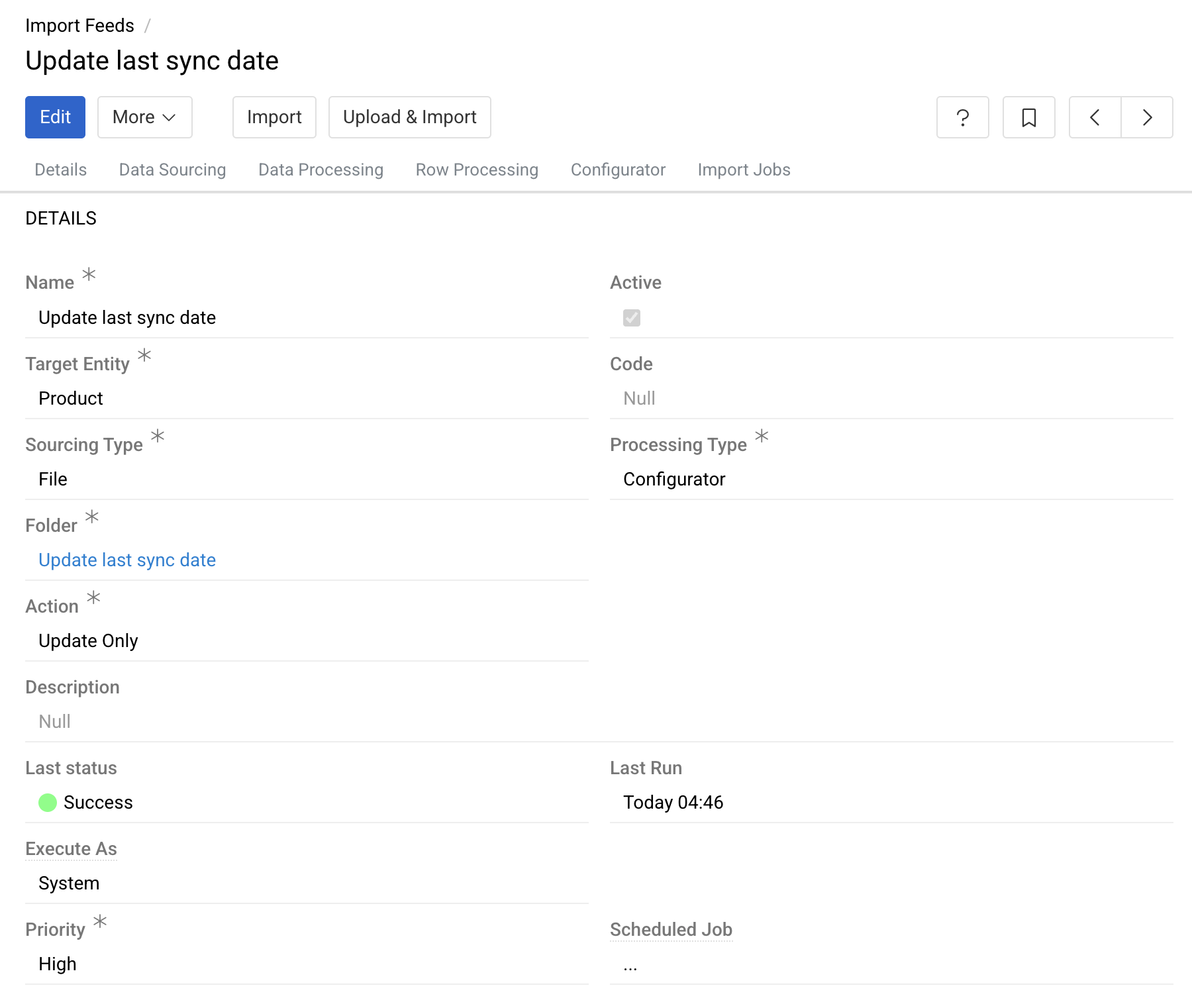
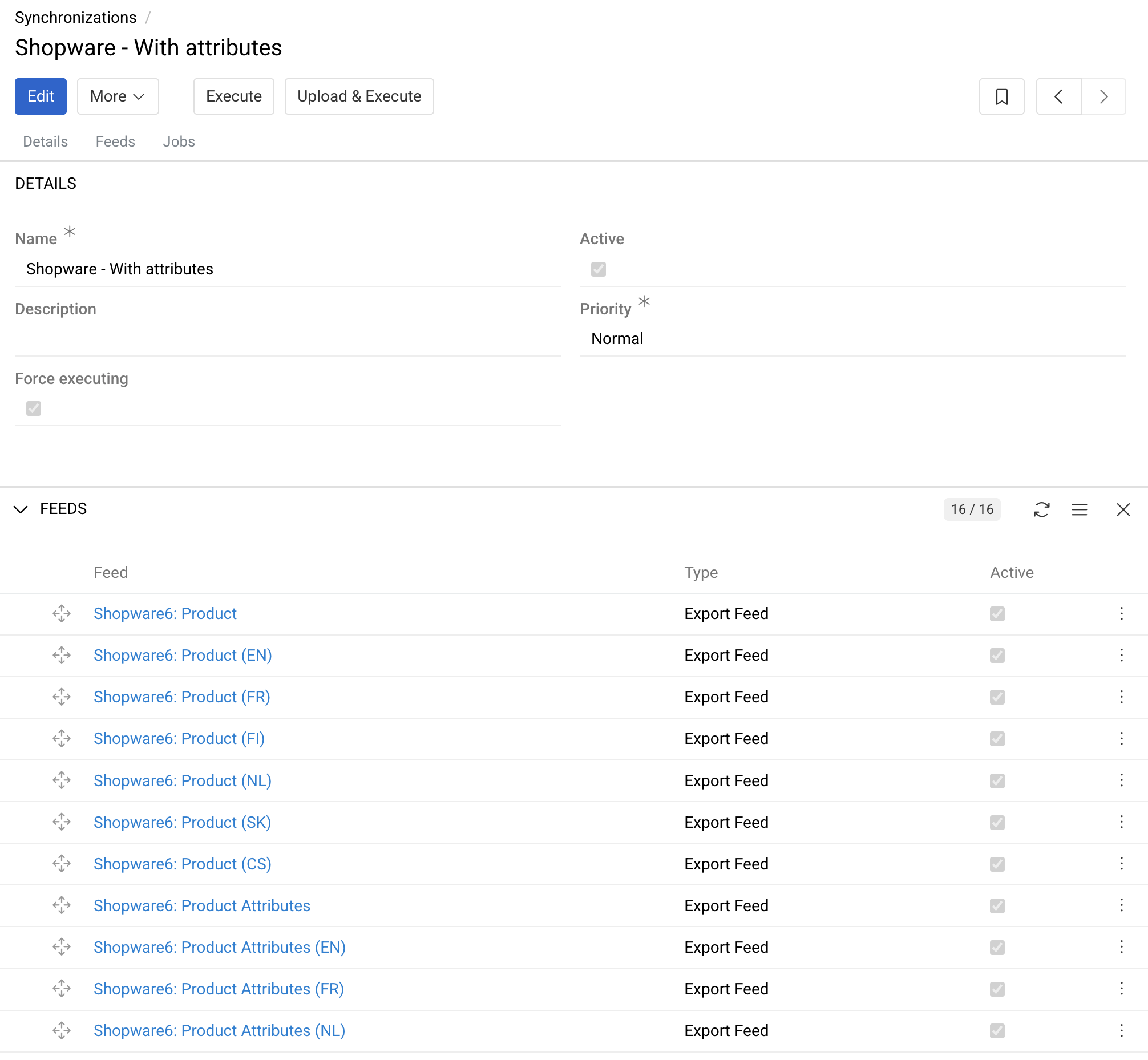
Synchronizations Consist of Import and Export Feeds
- One Feed per data scope and direction: a single Synchronization may contain an Import Feed for classifications from SAP Business One, a second one for product master data, and an Export Feed that publishes enriched product content to Microsoft Dynamics or your online shop.
- Individual configuration per Feed: source and target, endpoint or file definition, mapping, filters, action type, validation, and error handling are set per Feed, so a change to one Feed leaves every other Feed untouched and can be tested in isolation.
- Deterministic execution order: the sorting order within the Synchronization resolves dependencies reliably, for example, importing classifications and attributes before the corresponding attribute values, or creating products before their relations and asset assignments are written.
- Adapters with configuration templates: for recurring integration targets, we supply Adapters that encapsulate the endpoint definitions, data structures, and processing logic of the external system, add dedicated feed types, and ship pre-configured templates for connection and mapping settings, which shortens configuration and removes a large class of manual errors.
- Reusable and duplicable: an existing Feed is duplicated and adapted rather than rebuilt, which keeps comparable scenarios such as several sales channels, plants, or country subsidiaries consistent with each other.
- Configuration is data, not code: the entire setup is stored in the database and maintained through the administration interface. There is no compiled interface and no modified core, so version upgrades leave your integration intact, and when a connected system gains a new field, your administrator adds it to the mapping without a deployment and without developer involvement.
- Open source: at the end of the project, the configuration is handed over with mappings and schedules. The source code of the platform is open, so your team can audit exactly what happens to your data instead of trusting a black box.
Any Data Structure, Including Your Own Extensions
- Complete entity coverage: Feeds address any entity in the system, standard or custom, including products, categories, classifications, attributes, suppliers, and any additional entity your scenario requires.
- Language and channel-specific values: attribute values are transferred per language and per channel, so a multilingual catalog and channel-specific content are handled in the same Feed rather than requiring a separate interface per market.
- Relations, prices and stock information: relations of any cardinality, price and stock data, and category or classification assignments are transferred alongside the master data they belong to.
- Asset and binary transfer: images, documents and other files are imported by URL or from a file system path, with metadata, asset types and product assignments processed in the same run.
- Custom fields without development: entities and fields that you add yourself in the administration panel are immediately available as mapping sources and targets in every Feed, so extending the data model does not mean rewriting the interface.
- Field-level data mapping: mapping rules are defined separately for each entity field and each attribute, including source column or API path, target field, default values, mandatory flags, and the behavior for empty values.
- Mapping defines the scope of a write: only the fields contained in the mapping are written, so fields maintained in another system or enriched manually in AtroCore are not overwritten or emptied by an import that has no business owning them.
Formats, Transfer Logic and Data Transformation
- Full and delta transfers: full loads are used for initial migration and small reference data sets, delta loads for daily operation, based on modification timestamps, change flags, or the export queue of the source system, which keeps transferred volume proportional to actual changes.
- Deterministic record matching: records are identified by a stable business key such as SKU, ERP item number, or an external ID persisted on the target record, so repeated runs update existing data instead of creating duplicates, and an interrupted transfer is simply repeated.
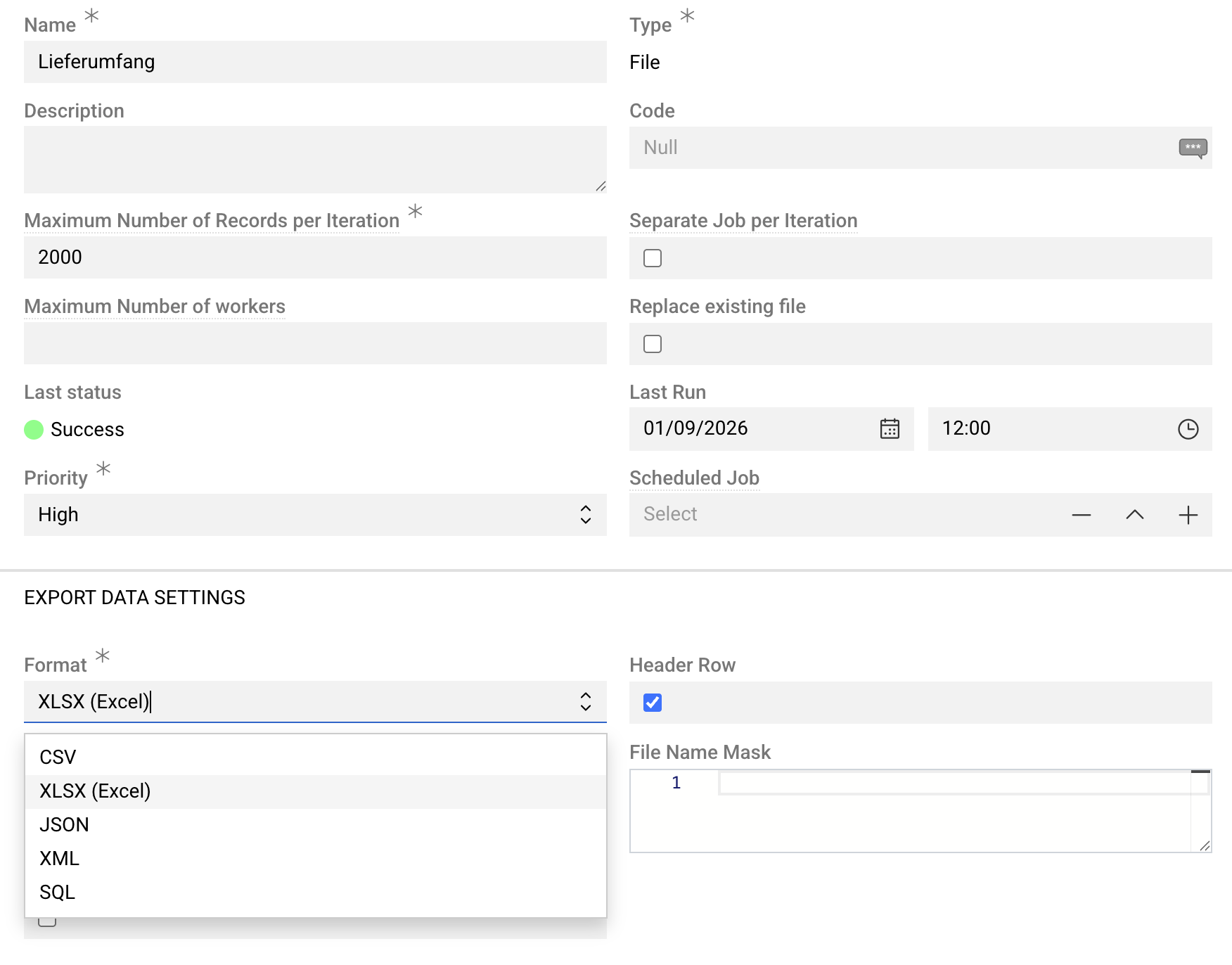
- Format-specific configuration: for CSV and Excel, this covers delimiter, enclosure character, character encoding, header row, worksheet, decimal and thousands separators, date and time formats, and the delimiter for multi-value fields. For JSON and XML, the relevant node paths are configured instead.
- Type-aware conversion: incoming values are converted into the target data type, which covers units of measure, currencies, boolean notations, enumerations mapped onto attribute options, and locale-specific number and date formats.
- Flexible action types: insert new records, update existing ones, insert and update in a single pass, delete records, or any combination of these, defined per Feed.
- Advanced filters: the transferred data set is restricted by field values, for example exporting only products with a released status, only items assigned to a specific Marketing Channel, or only records modified since the previous run.
- Transformations: transformations run before data is imported or exported, covering value mapping tables such as an ERP color code translated into an attribute option, unit and currency conversion, string operations, and the concatenation or splitting of fields.
Processing, Error Handling and Full Logging
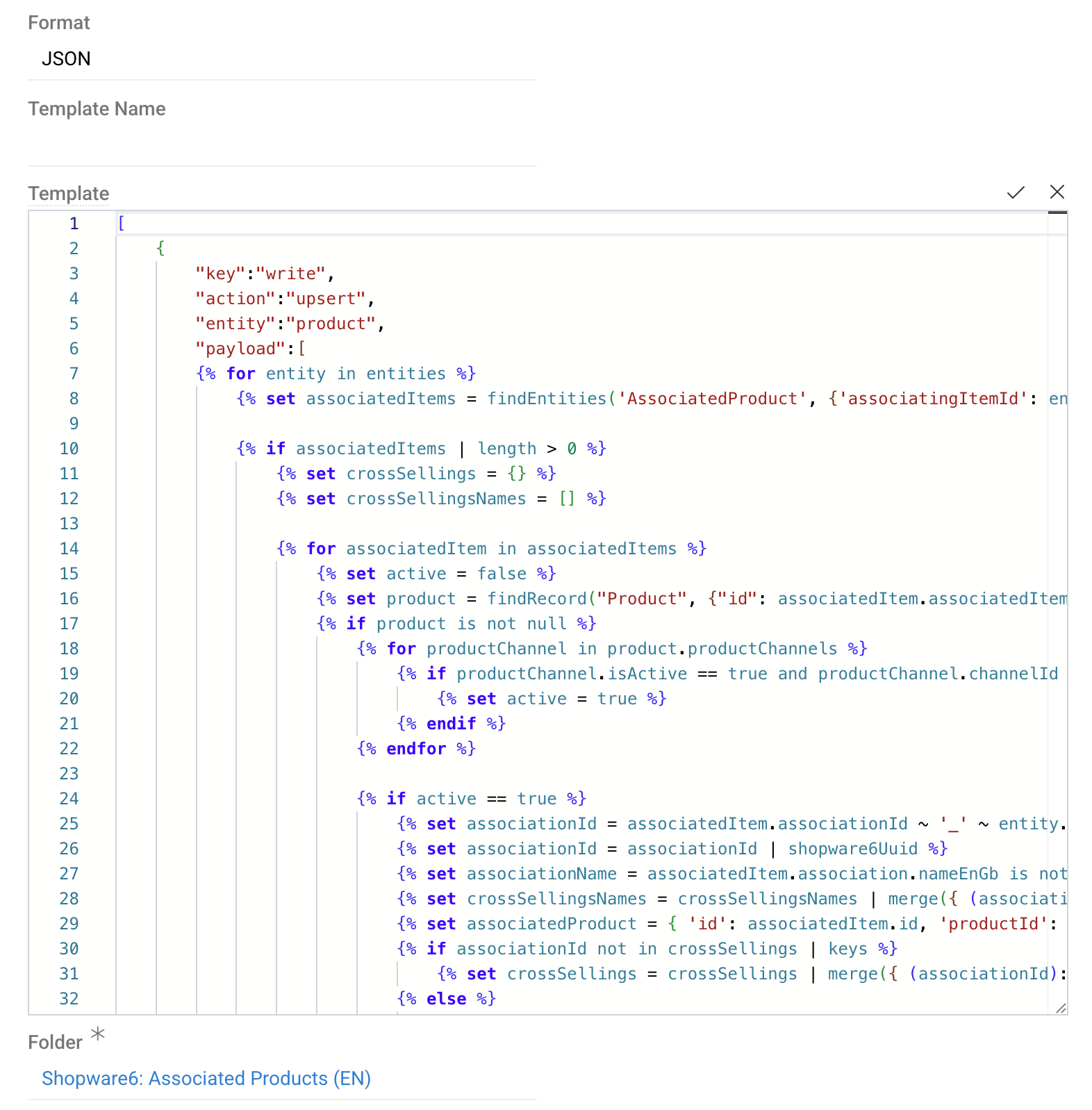
- Scripts for data preparation and processing: where standard configuration is not sufficient, scripts are attached to an Import or Export Feed in order to prepare or process the data before it is imported or exported, which keeps case-specific logic inside the Feed configuration instead of spreading it across the connected systems.
- Validation before data is written: mandatory fields, data types, permitted options, and referential integrity are checked during processing, so an invalid record is rejected with a readable message instead of silently degrading your data quality.
- Parallel Sub-Jobs: large payloads are split automatically into Sub-Jobs that are processed in parallel by the queue workers, which keeps runtimes predictable for data sets such as product records with a high number of attribute values.
- Optimized error processing: transient failures such as network timeouts or record locks are retried automatically, a failing record is isolated instead of aborting the whole run, and an error file containing only the rejected rows together with their messages can be exported, corrected, and reimported. Manual retrials are available for main Jobs and for individual Sub-Jobs.
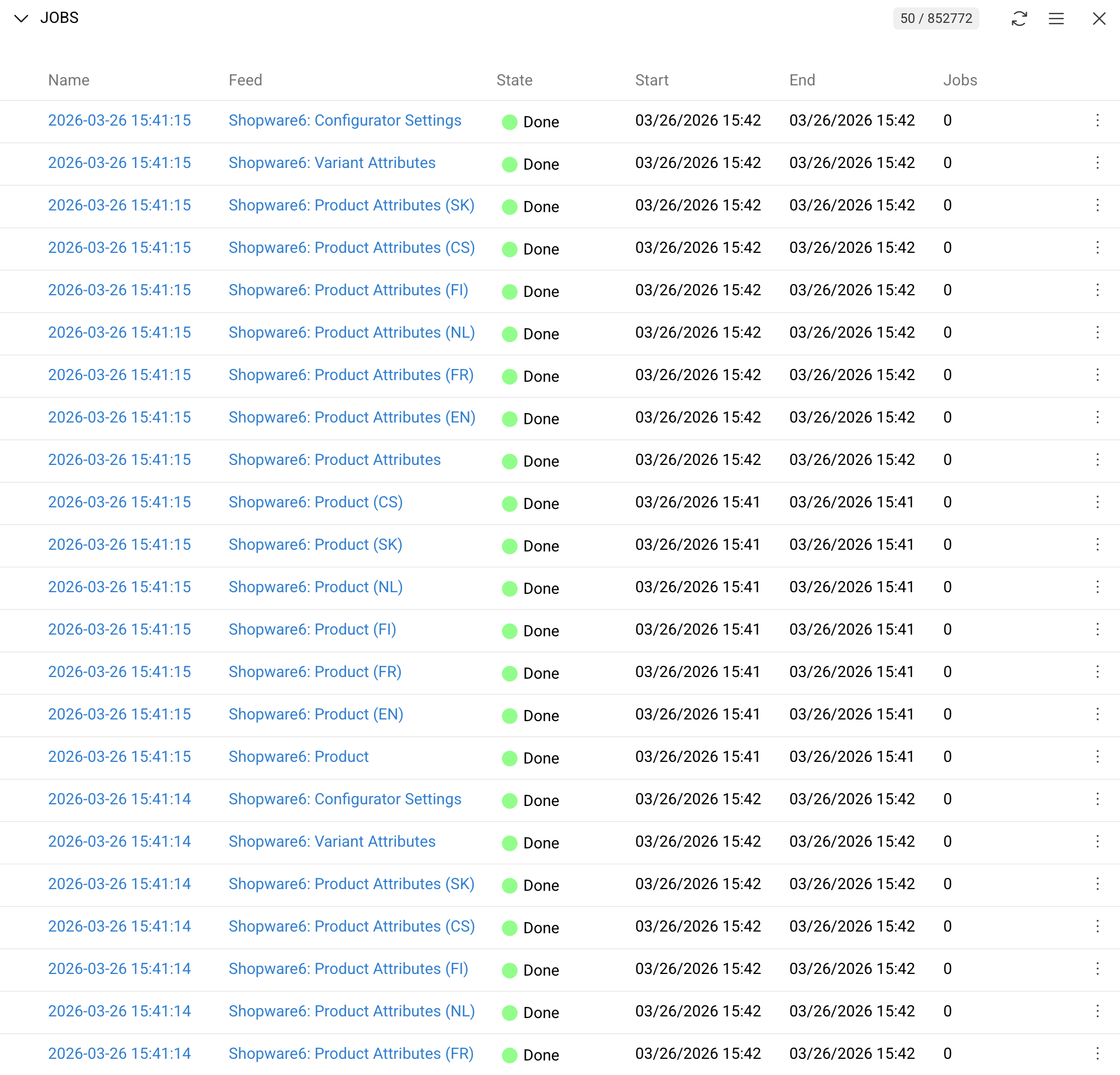
- Full logging: each Job stores start and end time, duration, the user or trigger that initiated it, the number of created, updated, deleted, skipped, and failed records, and per-record entries with the source payload and the resulting message.
- Dashboard monitoring and notification: Dashboard Widgets show the status and history of recent Jobs at a glance, and failures are reported by in-app notification or email, so a broken run is noticed on the day it happens rather than at the next data review.
- Housekeeping and retention: Jobs, log entries, and transferred files are subject to configurable retention, which keeps the database compact and supports data protection requirements where transferred data contains personal information.
Please contact us
FAQ
How do you implement an integration?
We start by analyzing the interfaces of the systems involved and documenting which endpoints, tables, or export formats are actually available, then agree with you on which system is the leading source for each entity and each field. On that basis, we configure one or several Synchronizations with their Import/Export Feeds, define the execution order, the mapping rules, the filters and the schedule, and validate everything on a staging instance with real extracts of your data before it is moved to production.
What data can be synchronized?
Any data the systems involved can provide. This covers product master data with attribute values per language and channel, categories and classifications, prices and stock levels, digital assets with their metadata, suppliers, customers and orders, as well as every custom entity and custom field you have added yourself. Fields you create in the administration panel are immediately available as mapping sources and targets, so extending your data model does not mean rebuilding the interface.
How is data synchronized?
Through REST, SOAP, and GraphQL API requests, direct database queries (typically against read-only views or a dedicated staging schema), or file exchange over SFTP, FTPS, HTTP(S), and mounted network shares. The most suitable method is selected individually for each case, and several methods are combined within one scenario where that is the more reliable option for the systems at the other end.
Is the synchronization real time?
It can be near real time. Each Synchronization runs manually, on a cron-based schedule down to minute intervals, or event-based when a record is created, updated, or reaches a defined status, with event-based triggers requiring the Workflows module. Most projects combine the modes, for example, an event-based export of released products to the shop plus a nightly reconciliation run.
Do I need additional middleware for this?
No. The integration layer is part of the AtroCore platform and runs on the same application server, so there is no separate ETL or iPaaS product to license, host, and monitor, and no second location where credentials and mapping rules have to be maintained.
Can I change configurations later?
Yes. All configurations are viewable and editable in the administration interface, from the Synchronization and its schedule down to the mapping of an individual field, and no programming is required. Because the configuration is stored as data rather than in code, your administrator adapts it when a connected system adds a column or changes a format, without a deployment and without developer involvement.
Is self-integration an option?
Technically yes, as nothing is hidden and the platform is open source, but it requires solid knowledge of the interfaces on both sides and of the feed configuration itself. We recommend having us build and document the initial scenario and hand it over to your team, which then maintains and extends it independently. This is how most of our customers work; for example, we connect the ERP, and they add further feeds for their shop and marketplaces themselves.
Will an update of AtroCore/AtroPIM break my integration?
No. Your Synchronizations, feeds, and mapping rules live in the database, and no modified core is involved, so version updates leave the integration configuration intact.
Does this also work if my ERP is on-premises and AtroCore is hosted?
Yes. The same mechanisms apply on-premises, in our hosting, and in hybrid landscapes. Which side initiates the connection and which transport method is used are configuration decisions that we make together with your IT team during the project.
How are credentials and network access handled?
Credentials belong to the connection rather than to an individual Feed, so a rotated secret is changed in exactly one place, and expiring tokens are renewed automatically. AtroCore normally initiates connections outbound, which means no inbound port has to be opened in your network. Where the remote system has to initiate, access runs through our REST API restricted by a dedicated API user, ACL rules, and optionally an IP allowlist or VPN. Configuration and execution rights are separated by role, and each Feed runs either in the name of the system or of the user who starts it.
How much data can be transferred, and how long does a run take?
Runs are processed by background workers in the job queue instead of in a user session, and large payloads are split automatically into Sub-Jobs that are processed in parallel, which keeps runtimes predictable for catalogs with a high number of attribute values. Throughput scales with the number of workers and the available CPU resources. Delta transfers based on modification timestamps or change flags keep the daily volume proportional to actual changes rather than to the size of your catalog.
What happens if a run fails or the other system is unavailable?
Transient problems such as network timeouts or record locks are retried automatically, and a failing record is isolated instead of aborting the entire run. Rejected rows are exported as an error file together with their messages, corrected and reimported, and both main Jobs and individual Sub-Jobs can be retried manually. Because records are matched by a stable business key such as SKU or an ERP item number, repeating a run updates existing data instead of creating duplicates.
Can an import overwrite data that we maintain manually?
Only the fields contained in the mapping are written, so values maintained in another system or enriched manually in AtroCore are not overwritten or emptied by an import that has no business owning them. During the project, we define per entity and per field which system is the leading source, which is what keeps two systems from competing over the same value.
Do I get logs?
Yes. Every Feed run creates a Job that records start and end time, duration, the user or trigger that initiated it, and the number of created, updated, deleted, skipped, and failed records, down to per-record entries with the source payload and the resulting message. Dashboard Widgets show the status and history of recent Jobs at a glance, and failures are reported by in-app notification or email.
How is personal data in transferred files and logs handled?
Jobs, log entries, and transferred files are subject to configurable retention, so data containing personal information is not kept longer than it is needed for error analysis and reprocessing. Together with role-based access to Jobs and configurations, this supports the documentation and deletion duties you have under the GDPR.