Integration Platform

Import data from any source, transform it to your own data model, and send it back out in the format each target system expects.

Our platform is a free, open-source solution for seamless system integration with any third-party system. Leveraging versatile Import and Export modules, it enables fully automated data exchange via REST API, effortlessly connecting your ERP, CRM, e-commerce platforms, and more.

What is a System Integration Platform?

A system integration platform centralizes, standardizes, and facilitates the automated exchange of data between disparate systems often used in complex IT ecosystems, ensuring that critical business information is synchronized and up-to-date.

system integration platforms enable organizations to connect disparate data sources, transforming data from multiple formats into a consistent, accessible, and often real-time view that is essential for analysis, operational efficiency, and decision-making. An integration platform allows to connect different systems such as:

  • ERP systems (e.g. SAP, Oracle, Microsoft Dynamics),
  • E-commerce platforms (e.g. Shopify, WooCommerce, Adobe Commerce),
  • Marketplaces (e.g. Amazon, Otto, Walmart, Mercado Libre),
  • Product Information Management systems (e.g. AtroPIM, Salsify, InRiver),
  • Customer Relationship Management (CRM) systems (e.g. Salesforce, HubSpot, Pipedrive),
  • Warehouse Management Systems (e.g. SAP EWM, Oracle's WMS),
  • Bookkeeping Software (e.g. QuickBooks, Xero, FreshBooks),
  • Marketing Automation Platforms (e.g. Mailchimp, Marketo), etc.

Who Needs an Integration Platform and Why?

You need a system integration platform if your organization operates multiple systems that require seamless data exchange. Manufacturers, wholesalers and Retailers can benefit from a platform like AtroCore to streamline workflows, reduce manual errors, ensure data consistency, and automate these processes. Common use cases include:

  • Companies with Large System Landscapes - large organizations that collect data from multiple departments, sources, or applications (such as CRM, ERP, e-commerce, and marketing platforms) benefit from a unified system integration solution. These platforms enable the consolidation of data across systems, reducing silos and improving data accessibility.
  • Manufacturing and Supply Chain - manufacturers and logistics companies need integration between supply chain management, manufacturing, ERP, and inventory systems. Integrated data enables better demand forecasting, inventory management, and production scheduling, ultimately improving efficiency.
    *Examples*: Synchronizing order information between partner systems, e-commerce platforms, and ERP systems.
  • E-Commerce and Retail – for a seamless customer experience, organizations require consistent, accurate data across sales, support, logistics, and marketing channels. system integration platforms streamline these flows, enabling real-time inventory updates, order tracking, and personalized interactions.
    *Examples*:Syncing inventory across warehouses and e-commerce, automating order and shipping transfers between e-commerce platforms and fulfillment systems.

Key Features

The features of the system integration platforms make them essential for managing today's data-rich environments by promoting seamless data connectivity, improving data quality, and providing a foundation for advanced analytics and business intelligence.

Automated/Manual Data Exchange

Before we begin planning, we organize a kickoff meeting with you to understand your business processes and specific requirements better. Based on this, we design a professional concept and initial project offer.

Unidirectional or Bidirectional Sync

You can choose between bilateral synchronization (two-way) to keep data updated across all systems, or unilateral synchronization (one-way), ideal when you only need to push or pull data from a specific system.

Event-Based and Time-Based Sync

Data synchronization can occur based on system events, like new orders or product updates, or on a pre-set schedule, such as hourly, daily, or weekly intervals, offering flexibility based on business needs.

Detailed Error Management

Platforms provide detailed logs and error tracking, ensuring that any failed synchronization jobs are automatically retried. Manual corrections and reprocessing are also supported, reducing downtime and data discrepancies.

Flexible Data Handling and Orchestration

The platform implements data quality checks to ensure accuracy, completeness, and consistency across datasets. It identifies and resolves issues such as duplicates, inconsistencies, or missing values, enhancing the reliability of data-driven decisions

100% Configurable Data Mapping and Transformations

Customize how data is structured and mapped between systems, ensuring that the fields and attributes align correctly, even when integrating with systems that have different data structures.

Data Quality Management

Integrates data quality checks to ensure accuracy, completeness, and consistency across data sets. Identifies and resolves issues in data, such as duplicates or missing values, which improves the reliability of data-driven decisions.

Unified Data Access and Centralization

Centralizes data into a unified platform, integrating information from multiple systems for improved analytics and reporting. Enables virtual data access, allowing users to view and query integrated data without physically relocating it.

Interested?
Book a free personalized demo or a quick consultation.

How AtroCore Integrations Work

Fully Configurable Data Synchronization with No Coding Required

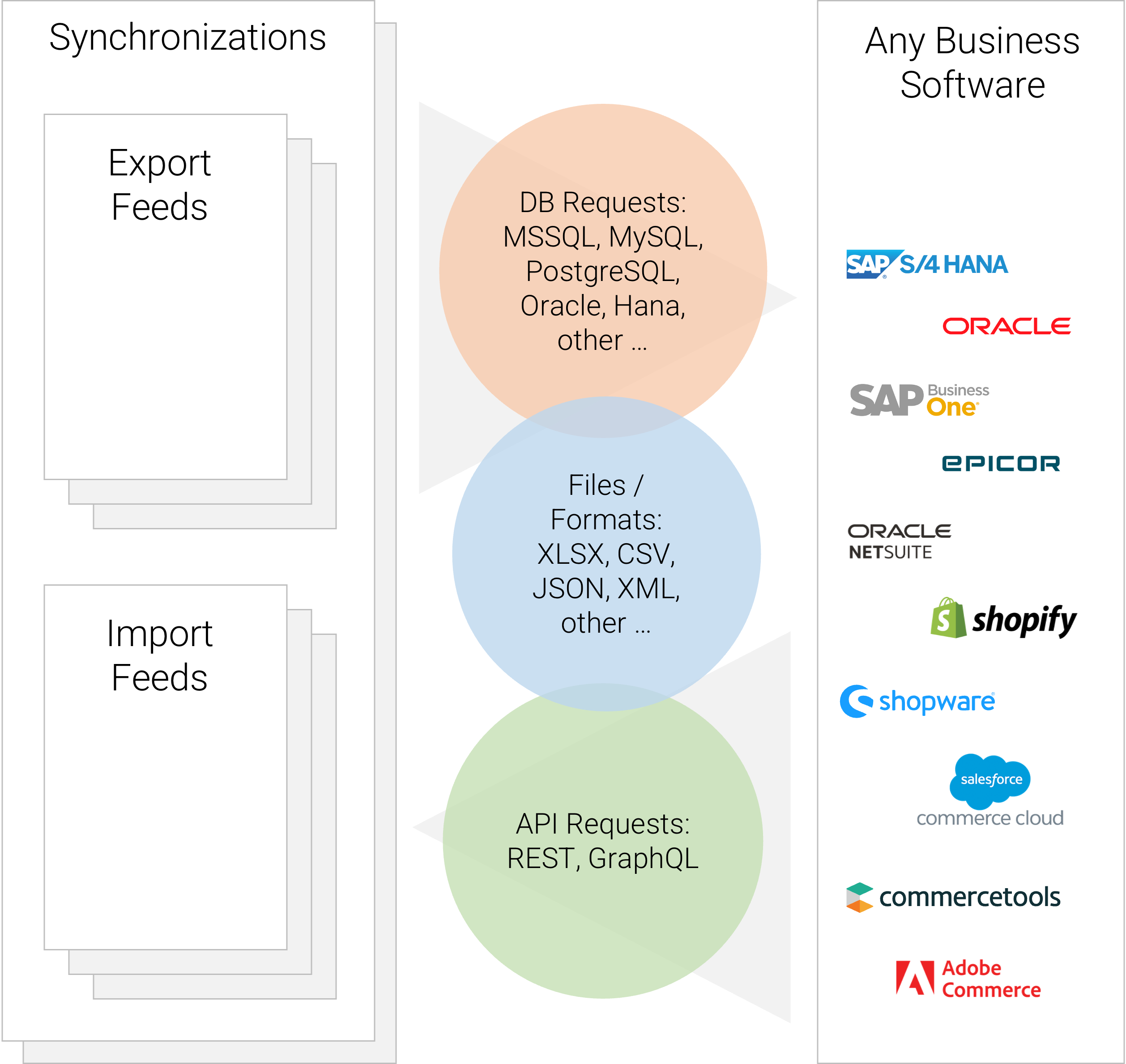
  • An integration consists of one or several configurable Synchronizations, each of which orchestrates the data exchange for a defined scope of data.
  • A Synchronization contains the assigned Import/Export Feeds and the order in which they run. The order matters because some data depends on other data, e.g., attributes have to be synchronized before attribute values.
  • A Synchronization can be started manually, on a time schedule, or by a system event such as the creation or update of a record. Individual Feeds can be triggered the same way, independently of their Synchronization.
  • Each Import/Export Feed defines which records are transferred, in which format and structure, and in which direction. Import Feeds pull data from the external system; Export Feeds push data to it.
  • Data is transferred via API requests, direct database queries, or file exchange. The method is chosen per Feed, so one Synchronization can combine several of them.
  • Per Feed, you configure the mapping of external fields to AtroCore entity fields and attributes, the action type (insert only, update, delete, or a combination), filters that select which records are included, and transformations that are applied before the data is written or sent out.
  • Each execution of a Feed creates an Import/Export Execution. Where a data set is large, the system splits it into Sub-Executions that run in parallel, for example when transferring products with many attributes.
  • Failed Executions are retried automatically. Records that still fail are written to an error file, which can be corrected and re-imported. Executions and Sub-Executions can also be retried manually.
  • Synchronizations and Feeds keep their own log, so a failure can be traced. Dashboard Widgets show the current state of the data exchange.
  • The complete configuration is visible and editable in the admin interface. When the data structure of a connected system changes, your administrator adjusts the affected Feed instead of requesting a code change.

AtroCore is a Free Open-Source Master Data Management System and Integration Platform

AtroCore is a completely free and open source system integration Platform with unmatched flexibility. It enables fully automated data exchange, allowing integration via REST APIs, file exchange or DB queries. AtroCore enables users to automatically connect to third party systems at no additional cost to the core platform.

Configurability

AtroCore offers a fully configurable data model and user interfaces, allowing businesses to tailor the platform to their specific needs. We go beyond being just another PIM, enabling comprehensive customization that supports a variety of use cases.

Excellent Connectivity

With a REST API that provides 100% functional coverage, including custom configurations, AtroCore facilitates seamless integrations. We can implement fully automated integrations with both unilateral and bilateral data exchange within a few weeks, ensuring smooth data flows between systems.

Affordable Open-Source Software

AtroCore is a fully open-source, cost-free solution, providing businesses with an affordable way to boost their system integration capabilities without straining their budgets.

User Friendliness

AtroCore Integration Platform is easy to navigate and understand, minimizing the learning curve and empowering users to achieve their goals with minimal effort and support.

Flexible Deployment

AtroCore can be deployed either in the cloud or on-premise within your organization's infrastructure, providing you with the flexibility to choose the setup that best fits your operational preferences.

Modularity

Our platform features a wide array of modules, allowing you to extend functionality as needed. You can choose and pay only for the modules that align with your business requirements, ensuring you get the most value from your investment.

Integration Modules

Syncronization

Syncronization

This module automates and orchestrates data import and export between systems, with customizable feeds, drag-and-drop sequencing, and detailed logs for smooth data exchange.

Import

Import

This module streamlines manual data import into any system entity and its relations, supporting multiple feeds and file formats to save time on initial imports.

Export

Export

This module enables manual or automated data import via HTTP requests, supporting REST/SOAP API calls for seamless system integration.

Import: HTTP Request

Import: HTTP Request

This module enhances Import capabilities by automating data imports from external systems via REST APIs or HTTP. It supports multiple formats, and offers flexible configuration with Twig.

Import: Database

Import: Database

This module automates data imports from MSSQL, MySQL, PostgreSQL, Oracle, and HANA, supporting various formats and flexible Twig configuration for seamless AtroCore integration.

Import: Remote File

Import: Remote File

This module automates data imports from external systems and remote files via FTP or URL, supporting multiple formats and flexible Twig configuration for AtroCore integration.

Export: Remote File

Export: Remote File

This module automates data exports to external systems and remote files via FTP or URL, supporting various formats and flexible Twig configuration for smooth AtroCore integration.

Export: HTTP Request

Export: HTTP Request

This module enhances Export by automating data exports to external systems via REST APIs or HTTP, supporting multiple formats and flexible Twig configuration for integration with AtroCore.

Export: Database

Export: Database

This module enhances 'Export' functionality, enables data transfer to MySQL, PostgreSQL, and SQL Server with customizable SQL queries and formats like CSV, TXT, JSON, and XML.

System Integrations

Use a central layer to orchestrate data and process flows between heterogeneous systems, ensuring scalability, reliability, and long-term maintainability.

ERP Software

  • SAP S/4HANA
  • SAP Business One
  • Microsoft Dynamics 365 Business Central
  • Infor LN, Odoo
  • Xentral, work4all
  • Oracle Fusion Cloud
  • NetSuite
  • Epicor
  • Acumatica
  • Xentral
  • Work4all
  • and others ...

Marketplaces & E-Commerce

  • Adobe Commerce
  • BigCommerce
  • Magento
  • Saleor
  • Commercetools
  • Sana Commerce
  • SAP Commerce Cloud
  • Vendure
  • WooCommerce
  • Spree
  • Sylius
  • Shopify
  • PrestaShop
  • Shopware
  • Salesforce Commerce Cloud
  • Amazon
  • OTTO
  • and others ...

Multichannel & DAM

  • Lengow
  • Feedonomics
  • Channable
  • ChannelAdvisor
  • ChannelEngine
  • ChannelPilot
  • Productsup
  • Bynder
  • CELUM
  • Canto
  • Cloudinary
  • and others ...

CMS & DXP, PLM & PDM

  • Contentful
  • Strapi
  • Adobe Experience Manager
  • Drupal, Acquia, Optimizely
  • Sitecore
  • Sanity
  • Storyblok
  • Teamcenter
  • Windchill
  • Aras Innovator
  • Autodesk Fusion Manage
  • Autodesk Vault
  • SOLIDWORKS PDM
  • OpenBOM,
  • Propel
  • and others ...

Please contact us

human test

FAQ

What does AtroCore's free offering include?

AtroCore is open-source and fully free. It allows for automatic data synchronization with other systems, with the option to purchase additional paid modules for advanced features.

Can I configure my own integrations?

Yes, AtroCore allows you to easily configure your own data synchronization scenarios without coding. However, if you're not confident in your technical skills, we recommend our team manage the initial setup for optimal results.

How do I synchronize data between systems?

AtroCore supports multiple methods, including API requests, file exchanges, and database queries, allowing seamless integration across various platforms like ERPs, e-commerce, and PIM systems.

What data can be synchronized?

You can synchronize a wide range of data, including product details, customer information, order data, and any custom data you need.

What are the costs involved?

You will incur charges for the initial setup of import/export feeds customized to your requirements, in addition to the costs for the integration modules utilized.

Can AtroCore Integration Platform be used on-premise?

Yes, the AtroCore can be deployed on-premise. There is no charge from our side.

Can I change configurations later?

Yes, our configurations are flexible and can be modified at any time without programming.

Do I get logs?

Yes, you'll receive detailed execution logs and can access import/export statistics through dashboard widgets.