


We’re glad to introduce our new Quality Check panel in the Data Quality module, designed to make it easier to monitor and maintain data quality in real time.
With this new panel, you can instantly see which rules pass or fail, apply filters (Passed, Failed, Not Applicable), and track overall progress through a live progress bar — just click it to recalculate data quality on demand. You can even create new quality checks right from the panel, without leaving your current view.
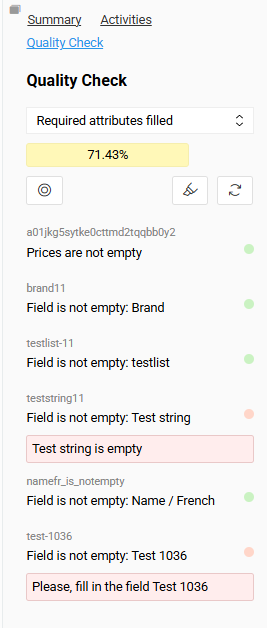
We’ve also added a customizable Error Message field with language translation support, so users can get clear, localized feedback when a rule isn’t met.
To make things even smoother, we’ve introduced a few practical improvements:
- “Refresh All Checks” button to update everything at once
- Filter option in the Data Quality Check widget for quicker access to the insights that matter most
What This Means for AtroCore Clients
These updates make it easier than ever to:
- See and understand data quality in real time
- Identify and fix issues faster
- Keep data clean, reliable, and ready for action
With the enhanced Quality Check panel, we’re helping you stay confident in your data every step of the way.